
Introduction
To study C++ basics, you need to understand the fundamental differences from other languages. Those differences lie in memory management, handling original variables, and dealing with addresses. Moving forward, we will learn about these concepts in C++.,
C++ Basics: Difference between Static Allocation and Dynamic Allocation
I will organize this because it's a very basic concept that you shouldn't not know, but it can still be confusing.
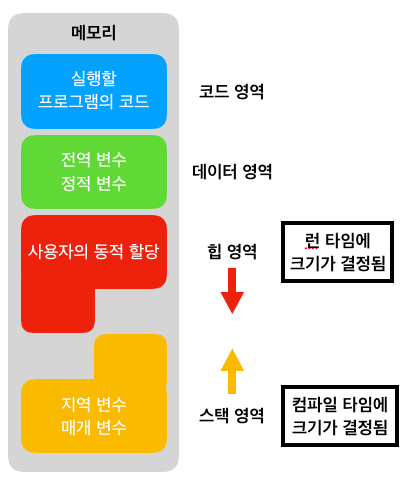
Static allocation and dynamic allocation are related to compilation; if the memory size and location are determined at compile time, it is static allocation, and if they are specified during runtime, it is dynamic allocation.
For reference, since static allocation is stored on the stack and dynamic allocation is stored on the heap, it remains in memory even after the function ends, so you must always deallocate it.
int main() {
    int n;
    cout << "배열 크기 입력: ";
    cin >> n;

    // 동적으로 배열 할당
    int *arr = new int[n];

    // 배열 채우기
    for (int i = 0; i < n; i++) {
        arr[i] = i * 10;
    }

    // 배열 출력
    for (int i = 0; i < n; i++) {
        cout << arr[i] << " ";
    }
    cout << endl;

    // 동적 할당 해제
    delete[] arr;
    // 값 타입이면 delete

    return 0;
}
Because it is impossible to change the size of an array at runtime, dynamic allocation must be used to receive input from the user and set the size. With static allocation, it is impossible to change the size of an array by receiving input from the user.
⚠️ You must free the memory using delete[] – since the memory was allocated as an array, it must be deallocated as an array.
General variables are freed with delete.
Functions and Structures
Of course I know functions and structs, but what is C++? Isn't it a language that deals with memory? That's why we could change values by using pointers as a way to pass values to functions.
function parameters
void changeValue(int *ptr) {
    ptr += 5;
}

int main() {
    int num = 10;
    std::cout << "num before change: " << num << std::endl; // 10

    changeValue(&num);  // Pass the address of num

    std::cout << "num after change: " << num << std::endl; // 15

    return 0;
}
In this way, you can pass the address of a value type and modify it as desired.
void changeValue(ref int number) {
    number++;
}
int x = 5;
changeValue(ref x);  // x is now 6
void changeValue(out int a) {
a = 10;
}
int y;
changeValue(out y); // y is now 10For reference, in C# as well, ref와 out You can change the value using keywords, refis that initialization must be performed outis that you don't have to do it.
struct
struct Person{
    string name;
    int age;
    float height;
}
If you created a struct like this, you need to access it
Person adult;
adult.name = "yoon";
adult.age = 24;
If it is statically allocated like this, the individual members inside the structure .can be accessed using.
Person *adult = new Person;
adult -> name = "yoon2"
adult -> age = 23;
Dynamic allocation is ->It must be accessed using.
Person* arr = new Person[3];
arr[0].name = "Alice"; // Using the . operator
arr[1].age = 25;
For your information, when accessing array elements, both static and dynamic methods are used. .is used.
Constant
In C#, you can create constants using `const` and `readonly`; similarly, in C++, you can create constants using `const`. (`readonly` is not supported.)
Reference variable
Pointer variables and constness
int main() {
    int a = 2;
    const int *ptr = &a;

    a = 1; // Compiles successfully
    *ptr = 10; // Error
}- If you make a pointer variable a constant, you cannot change the value through the dereference operator.
int main() {
    int a = 2;
    int b = 1;
    int *const ptr = &a;

    a = 10; // Compiles successfully
    ptr = &b; // Error
}- If you make the pointer variable itself constant, you cannot change the variable that the pointer variable references.
Reference variable
Referencing the original variable rather than the memory address.
In c#, `ref` and `out` are reference variables, that is, reference variables.
When representing reference variables, the & is sometimes placed in front of the variable name, but since this is easily confused with the syntax for pointing to a pointer's address, it is standard practice to distinguish them by placing the & right after the type instead.
// Declare parameters as reference variables
void swap(int& ref_a, int& ref_b) {
    int temp = ref_a;
    ref_a = ref_b;
    ref_b = temp;
}

int main() {
    int a = 5;
    int b = 10;
    swap(a,b);
    cout << "a: " << a << ", b: " << b << endl; // 10,5
    return 0;
}
By doing this, the original variable is passed as a parameter, and the swap happens successfully.
int& ref_a; // errorFor your information, if you do not declare the variable to be referenced when declaring a reference variable, an error occurs.
int a = 10;
int& ref_a = a;
int b = 20;
ref_a = b;
Because a reference variable cannot be modified to refer to another variable, writing it this way does not change the referenced variable, but instead changes the value of a to 20.
Exception handling
Actually, as I’ve been learning C++, I’ve come to realize that C# was a very convenient language. You probably know that you need `try`, `throw`, and `catch` to handle exceptions. However, in C++, you must explicitly write `throw` for exceptions to work.
try {
    int[] arr = {1,2,3};
    Console.WriteLine(arr[10]); // Exception is thrown automatically
} catch (Exception e) {
    Console.WriteLine(e.Message); // Handled in catch
}
In C#, even without explicitly writing a `throw` statement like this, the exception was automatically thrown at runtime… Thanks, C#…. But that’s not the case with our C++.
try {
    int a = 10, b = 0;
    int c = a / b; // Division by zero (runtime error)
    cout << c << endl;
} catch (const char* msg) {
    cout << "Exception occurred: " << msg << endl;
}
This C++ code does not trigger the catch block and causes the program to terminate abnormally. The reason is that without a throw, the exception cannot be handled.
try {
    int a = 10, b = 0;
    if (b == 0) throw "Cannot divide by 0!";
    int c = a / b;
    cout << c << endl;
} catch (const char* msg) {
    cout << "Exception occurred: " << msg << endl;
}
You need to handle exceptions using `throw` in areas where such errors might occur.
For detailed information on C++ syntax and standard libraries official cppreference documentationIt is helpful to refer to.
Stack unwinding
It is the process of “unwinding” the call stack when an exception occurs in C++, cleaning up the variables and objects of each function until the exception is handled.
void func3() { throw std::runtime_error("Exception occurred!"); }
void func2() { func3(); }
void func1() { func2(); }

int main() {
    try {
        func1();
    } catch (std::exception& e) {
        std::cout << e.what() << std::endl;
    }
}
When an exception occurs in func3, the stack unwinds in the order of func3() -> func2() -> func1() -> main, and each function is cleaned up.
Omit exceptions
void safeFunction() noexcept {
    // Code that does not throw exceptions
    std::cout << "This function will not throw exceptions." << std::endl;
}
noexcept You can explicitly indicate that a specific function does not throw exceptions through keywords. This creates advantages in terms of optimization.
However, if an exception occurs, terminate() is called immediately and the program exits right away.
void myTerminate() {
    std::cerr << "Unhandled exception! Program will terminate." << std::endl;
    exit(-1); // Must terminate
}

int main() {
    std::set_terminate(myTerminate);
    throw 1; // Unhandled exception
}set_terminateis the function that replaces the default termination behavior when an “unhandled exception” occurs in C++ and causes the program to terminate.
Therefore, set_terminate must always include logic to terminate the program.
Exit codes include abort(), exit(), quick_exit(), etc.
Template
A function template is a syntax that generalizes a data type into a single form—a concept similar to generics in C#.
template
T Add (T a1, T a2) {
    return a1 + a2;
}

int main() {
    int    x = Add(1, 2);        // T is automatically inferred as int
    float  y = Add(1.5f, 2.5f);  // T = float
    double z = Add(1.2, 3.4);    // T = double
}
This allows you to cover multiple data types at the same time.
Explicit call
- This is a method of explicitly writing the type instead of letting the compiler automatically infer it.
template
T Add(T a, T b) { return a + b; }

// 1) Type inference (implicit call)
int    a = Add(1, 2);          // T = int
double b = Add(1.2, 3.4);      // T = double

// 2) Explicit invocation
int    c = Add(1, 2);     // Explicitly specifies T = int
auto   d = Add(1, 2);  // Although the arguments are int, T is inferred as double
template specialization
Template specialization means keeping the primary template as is while creating a different version specifically for a particular type.
// 1. Basic function template
template
void LogDamage(T dmg) {
    std::cout << "[DMG] " << dmg << "\n";
}

// 2. Specialization for `int`
template <>
void LogDamage(int dmg) {
    std::cout << "[DMG:int] " << dmg << " (critical)\n";
}
You can just separate the data types you want to specialize like this.
When specialization is performed, the specialized part is executed instead of the base template.
public static class Logger
{
    public static void Log(T v)
    {
        Console.WriteLine($"[GENERIC] {v}");
    }

    // Overload for int only
    public static void Log(int v)
    {
        Console.WriteLine($"[INT] {v} (critical)");
    }
}
You can also specialize generics in this way in C#.
class template
Creating a universal class with a template makes it a class template. When a class is made into a template, its member variables and member functions are handled as templates.
(Does not necessarily have to be a template)
template
class PlayerStat {
public:
    T hp;                  // Template type
    int level;             // Regular type
    static int onlineCnt;  // Can also be static

    void AddHp(T v) {      // Member function using a template type
        hp += v;
    }

    void LevelUp() {       // Regular member function unrelated to templates
        level++;
    }
};

template
int PlayerStat::onlineCnt = 0;;
This is how the class itself is templated.
PlayerStat    p1;  // T = int
PlayerStat  p2;  // T = float
And when first declaring a class template, the data type must also be specified together.
클래스 템플릿 부분 특수화
template <typename T1, typename T2>
class Pair {
public:
    T1 first;
    T2 second;
};

// T1 = int, T2는 아무 타입(T) 가능
template <typename T>
class Pair<int, T> {
public:
    int first;
    T   second;

    void Print() {
        std::cout << "[int, T] " << first << ", " << second << "\n";
    }
};
이렇게 특정 부분만 특수화를 진행할 수 있다.
// 기본: 어떤 타입이든 그냥 복사해서 패킷 생성
template <typename T>
class PacketWriter {
public:
    void Write(const T& data) {
        // data를 그대로 직렬화
    }
};

// 부분 특수화: 포인터 타입만 특별 처리 (널 체크 등)
template <typename T>
class PacketWriter<T*> {
public:
    void Write(T* data) {
        if (data == nullptr) {
            // 널 포인터면 '없음' 패킷
        } else {
            // *data를 직렬화해서 TCP로 전송
        }
    }
};
참고로 포인터 타입으로 특수화를 진행할 수도 있다.
정말 유용한 정보입니다 감사합니다!